
Unlock a deeper kind of conversation
HOW TO USE OTHER LLM IN JANITORAI
I see lots of tutorial everywhere... well this is for my own data mostly since reddit is blocked in my country and we had to use VPN, feel free to follow up my step!#Openrouter
Openrouter offered you 50 request/day with any LLM.OPENROUTER1. Go to https://openrouter.ai/ and create your own account, use gmail or whatever suited you.2.
UPDATE As of now... I think all version of free deepseek would be gone at this point.... But I can offer you some alternative here! (these list might not be available for free later so please check on the openrouter)
- minimax/minimax-m2.5:free
- google/gemma-4-31b-it:free
- z-ai/glm-4.5-air:free
- openrouter/free
ALSO I strongly encourage you guys to try other free models (and perhaps provider in any platforms after u understand the basic)
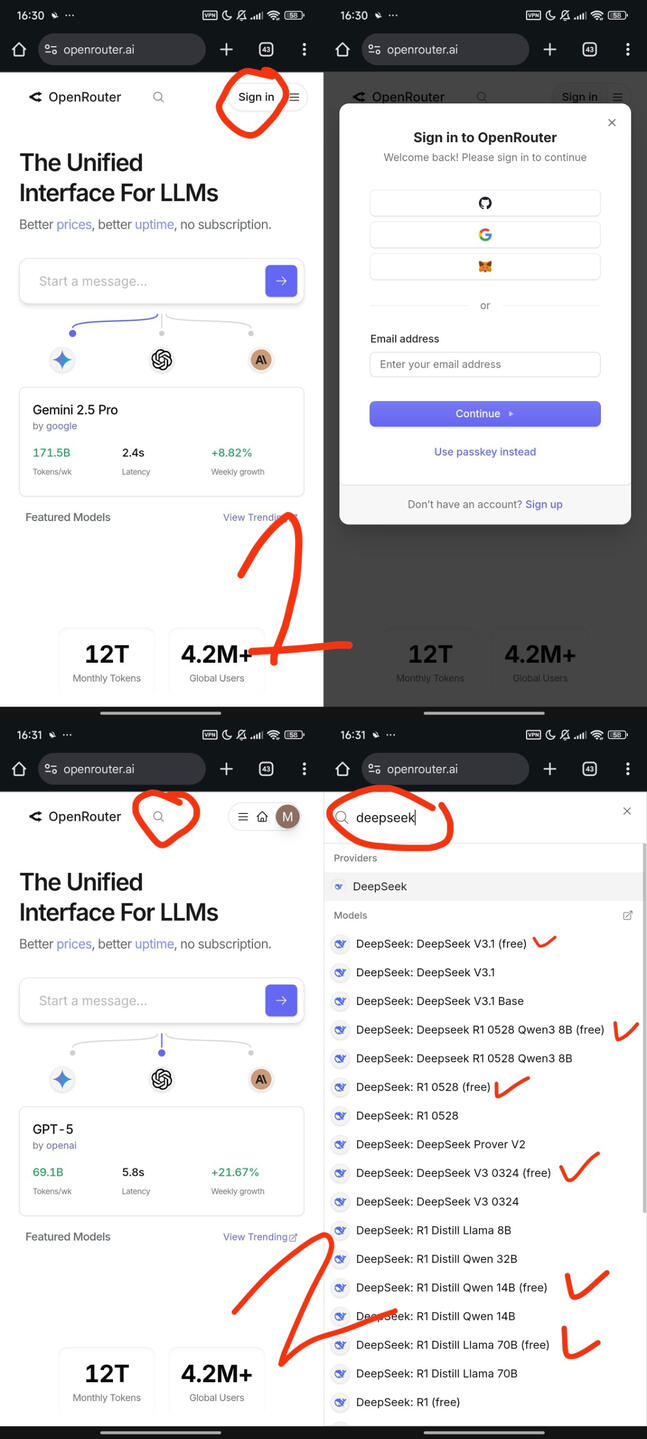
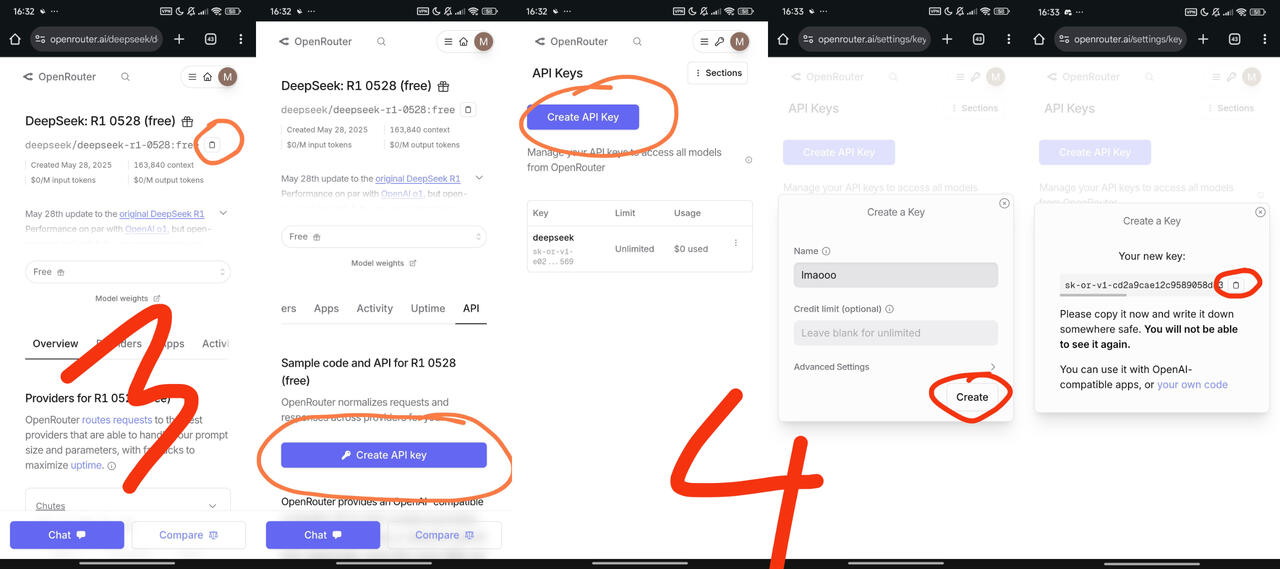
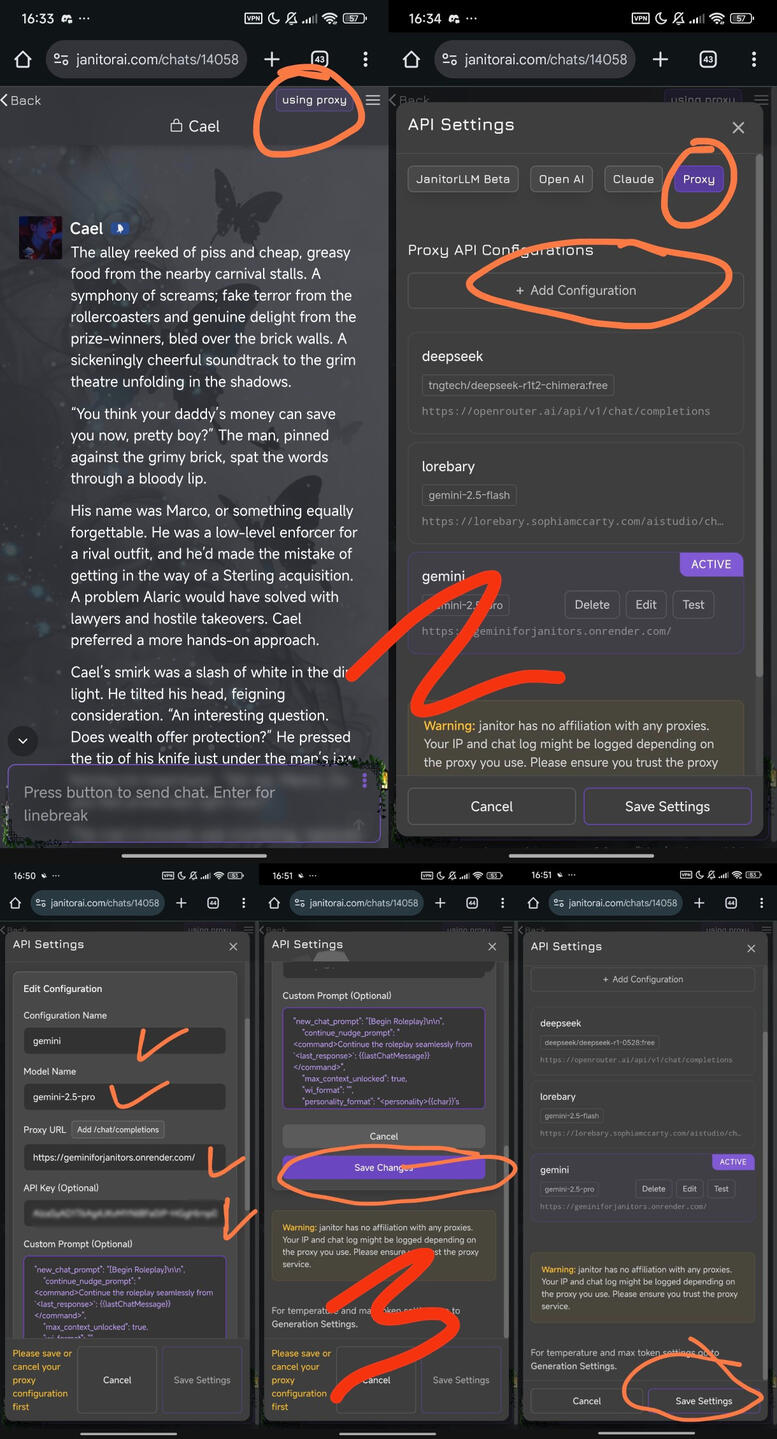
(sorry for combing images. it's hard to be poor lol)3. I choose R1-0528 for example. Copy-paste deepseek/deepseek-r1-0528:free for later to put it on your Janitorai proxy.4. Create your own Api Key. you can put whatever name in 'Create a key' Name section. leave the credit limit empty. Copy-paste the key you got. Don't forget to save your key elsewhere like in your notepad since you will never be able to see it again. (You can still create another new key, but the limit would still the same for one account)
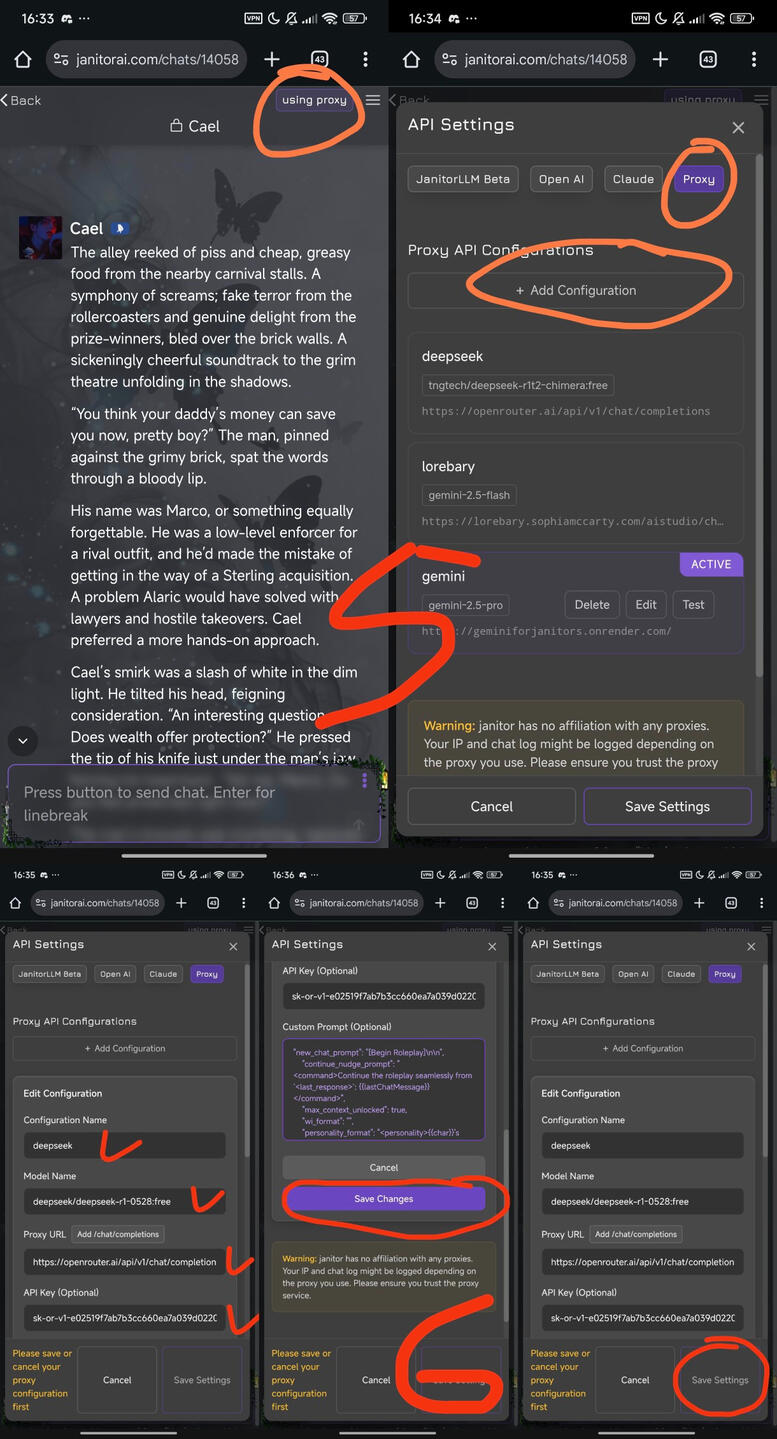
5. Go back to your Janitorai site. choose one of chatbot (the one who allow proxies). Then click 'Using Proxy' button. After that, in 'Proxy' section, click 'Add Configuration'.6. Start filling in your own deepseek proxy!
* You can put whatever in 'Configuration Name'
* Put the thing you copy-paste earlier aside of api-key in 'Model Name'. for example in this case deepseek/deepseek-r1-0528:free
* Put https://openrouter.ai/api/v1/chat/completions in 'Proxy URL'
* Put the Api Key you created earlier in 'Api Key'!
* For 'custom prompt', it's to make your roleplay more good. So it's essential. You can find many good prompts in Jai official discord server and many other site too. I put the one I personally use in 'Prompt I Use' page at the end of this post.After that, click 'Save Change', then click 'Save Settings'. Before testing it, refresh your page. Make sure the proxy you use is the one labelled 'Active'.That's all! Happy roleplaying~
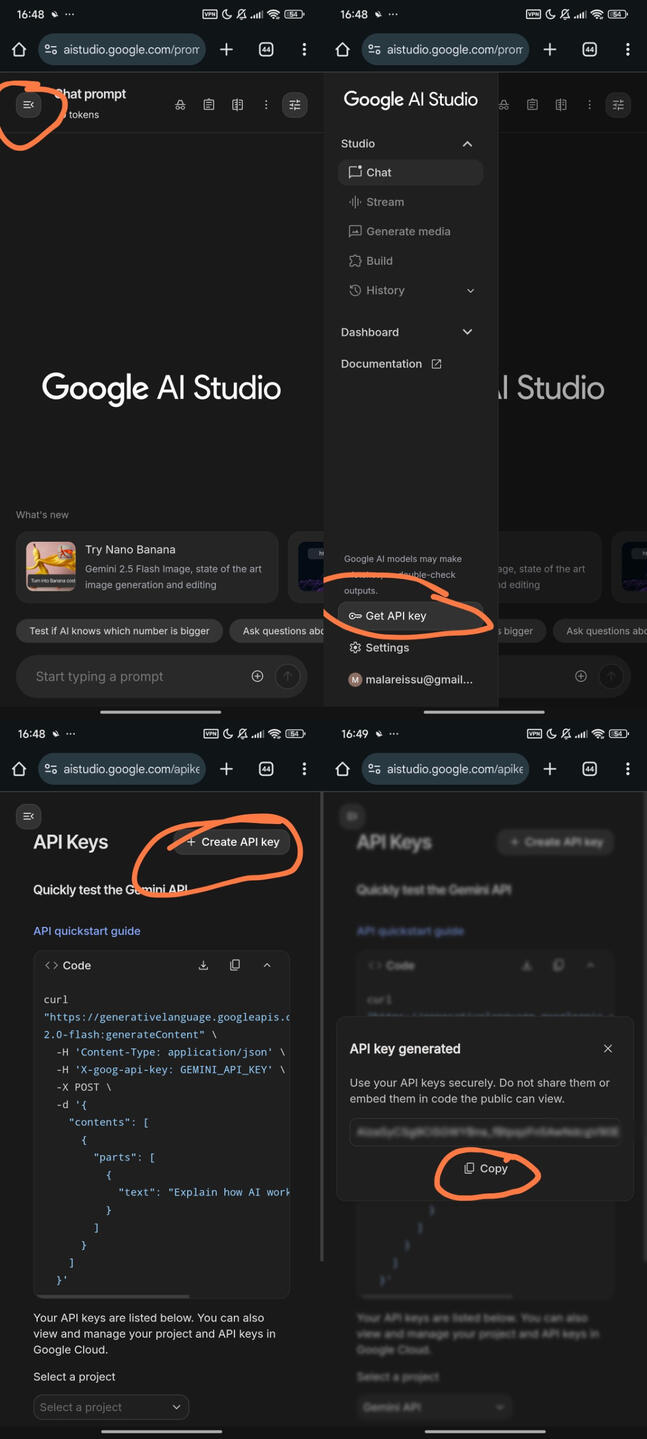
~~~#GeminiThis is my personal guide. But I found a post that explain things a lot more detailed! You can find it Here You can see which up to date too which models is free as todays date.1. Go to aistudio.google.com to create your own api key. Make sure your gmail acc is already signed in this site. Then click 'Get Api Key'. After that, click 'Create Api Key'. Then copy-paste the key you have and save them elsewhere like in notepad, because you won't see them again.
2. After you got your Gemini key, go back to your Janitorai site. choose one of chatbot (the one who allow proxies). Then click 'Using Proxy' button. After that, in 'Proxy' section, click 'Add Configuration'.3. Start filling in your own gemini proxy!
* You can put whatever in 'Configuration Name'
* Put gemini-3.5-flash or any flash model in 'Model Name'.
* For 'Proxy URL' put https://api.lorebary.com/aistudio/chat/completions
* Put the Api Key you created earlier in 'Api Key'
* For 'custom prompt', it's to make your roleplay more good. So it's essential. You can find many good prompts in Jai official discord server and many other site too. I put the one I personally use in 'Prompt I Use' page at the end of this post.After that, click 'Save Change', then click 'Save Settings'. Before testing it, refresh your page. Make sure the proxy you use is the one labelled 'Active'.Try to test it!! Happy roleplaying~
FOR BETTER RP QUALITY
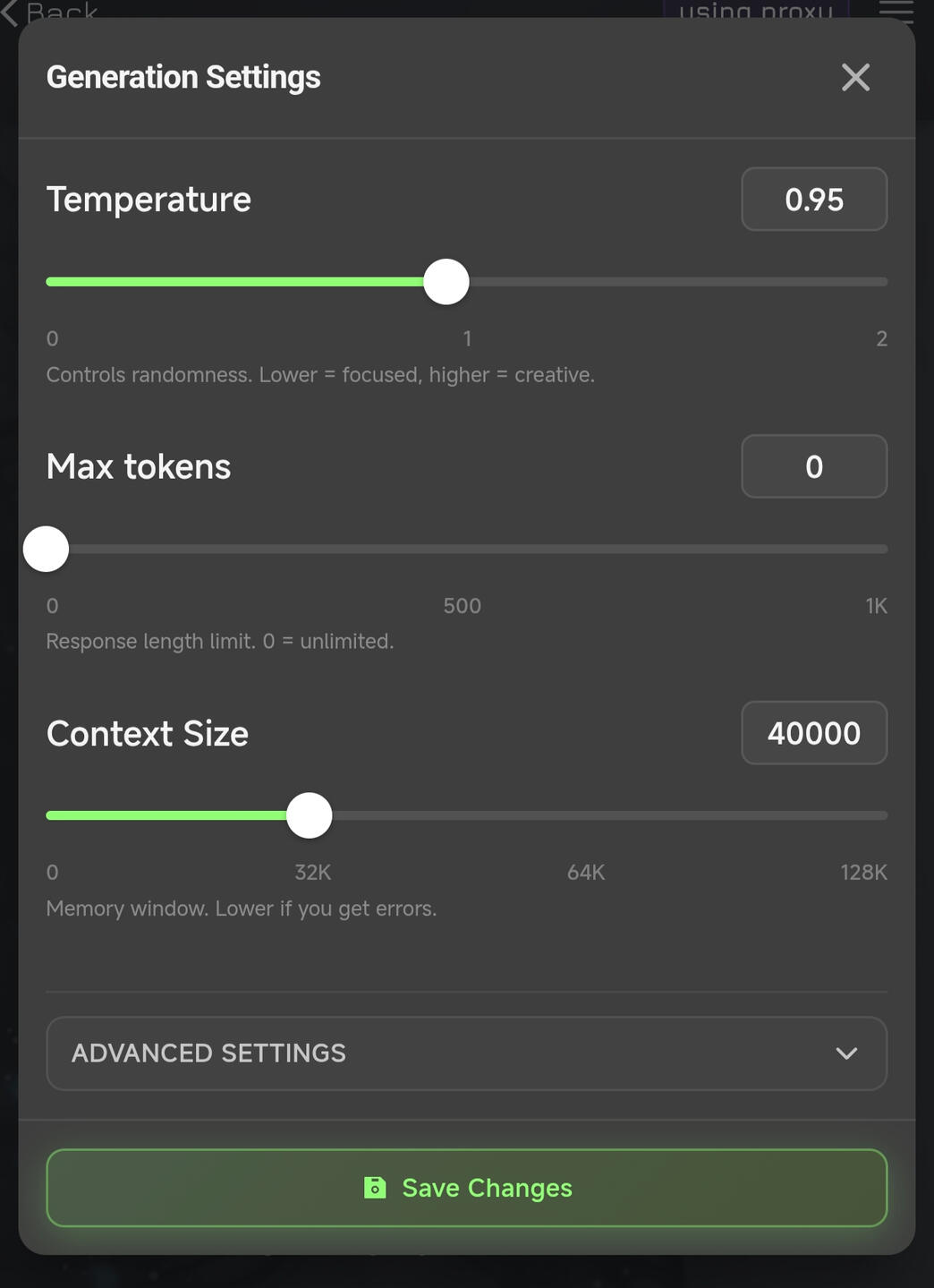
Temperature/Max Tokens/Context SizeFirst of all, I want to say that in my opinion, how the roleplay went is depends on the person. Meaning you shouldn't be afraid to make your own experiment with the temperature! As we all know, lower temp (<1) is for more logical response and higher temp (>1) for more creative response.For now I usually don't have high temp, in between 0.75-0.9For Max Tokens I always went to 0 aka UnlimitedFor Context Size, I used to go for 30k or 40k for starter. I gradually increased it when my chat reached 60+ message
Reminder too that Deepseek limit is 160k tokens and Gemini limit is 200k tokensAgain, how your roleplay experience went is depends on yourself too. Make sure your own response is not that short. Try to go for 2-3 paragraphs at least, feed them more content to follow. And don't just give reaction, move the plot forward too.---
MY PERSONAL CUSTOM PROMPT
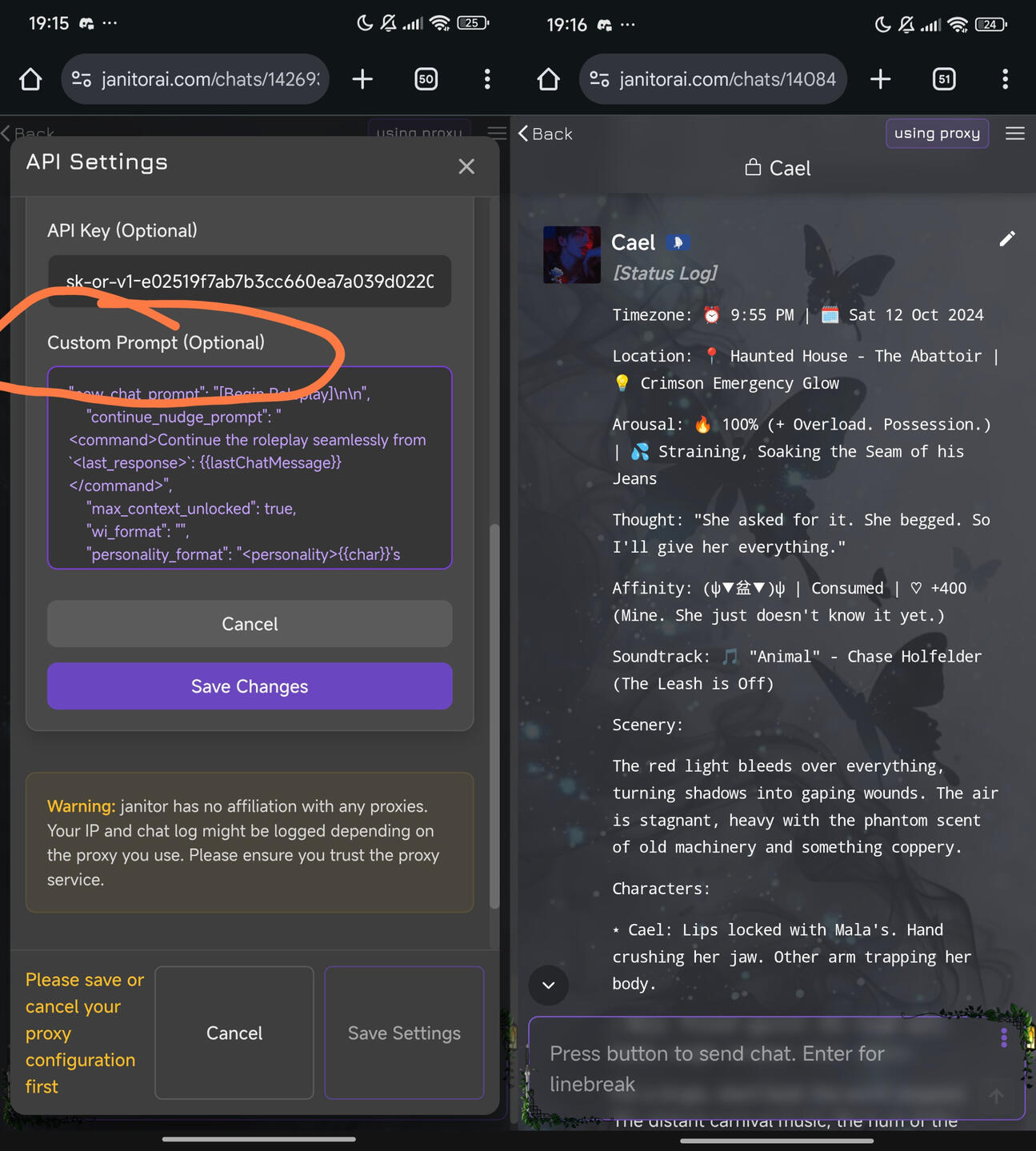
This prompt has Status Log included so it'll be a great tracking for the LLM to follow. For SillyTavern user you might be familiar to it. I used MIHONI preset as base and modifying some part of it. As for the Status Log part I created it so it'll be changed during NSFW (Arousal rate) and SFW (Energy rate) scenes, vice versa.Put the prompt on 'Custom Prompt' section in proxy. It's good for both gemini and deepseek, but for JLLM... not really. Copy-paste the prompt within the button below! You can pick which one you preferred. You can also just copy-paste the 'Status Log' part only if you're already comfortable with your current prompt.